TrackPoint architecture
The X240 keyboard has a TrackPoint. Earlier revisions of this project did not mention it. It is a first-class feature: the finished keyboard must move the cursor from the stick and click from the ClickPad’s button zones.
How the X240 routes the TrackPoint
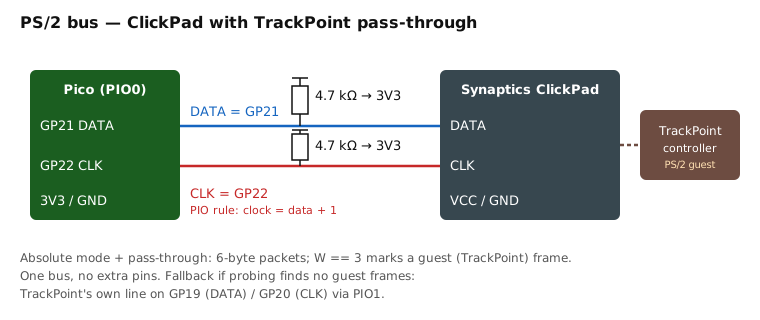
In this generation of ThinkPads the TrackPoint does not have its own line to the host.
The stick’s strain-gauge board feeds a controller (TPM754-class) that speaks PS/2, and that
PS/2 stream goes into the Synaptics ClickPad’s guest port. The ClickPad forwards the
guest’s packets to the host inside its own packet stream. Linux shows this as
serio: Synaptics pass-through port at boot.
TrackPoint strain gauges
   → TrackPoint controller  (PS/2 out, inside the keyboard)
      → ClickPad Synaptics guest port  (inside the palmrest)
         → ONE PS/2 bus  →  Pico GP21 (DATA) / GP22 (CLK)
Consequence: no extra wires or pins. The Pico sees one PS/2 device. Everything else is firmware.
This is the expected chain. It is confirmed by the M2 ClickPad probing step — the extended sniffer reports whether pass-through frames appear when the stick is pushed. Do not wire for the fallback until that measurement says so.
What QMK does and does not do
QMK’s ps2_mouse feature speaks plain PS/2 relative mode: 3-byte packets, X/Y deltas,
three buttons. In that mode a Synaptics ClickPad behaves like an ordinary PS/2 mouse and
silently drops the guest stream — the TrackPoint is dead.
So the firmware does not use ps2_mouse at all. It keeps QMK’s RP2040 PIO PS/2 host
(PS2_ENABLE = yes, PS2_DRIVER = vendor) and implements the pointing device itself
(POINTING_DEVICE_DRIVER = custom): put the ClickPad into Synaptics absolute mode with
pass-through enabled, then decode the 6-byte packets. That is synaptics.c /
trackpoint.c — ../firmware/pointing-stack.md.
The Synaptics protocol, briefly
Spec: Synaptics TouchPad Interfacing Guide (PN 511-000275; no longer hosted publicly — the working reference is the Linux driver drivers/input/mouse/synaptics.c).
The Linux psmouse driver (drivers/input/mouse/synaptics.c) is the working reference
implementation.
Identify (“magic knock”). Send SetResolution four times with the value encoding a
query number, then StatusRequest (0xE9); the three status bytes carry the answer. Query
0x00 returns identification — byte 1 must be 0x47 for a Synaptics device.
Mode byte. Written with the same knock followed by SetSampleRate 0x14. Bits we set:
Absolute (bit 7), Rate 80 (bit 6), W-mode (bit 0). Pass-through is enabled per the
guide’s “extended capabilities” sequence when capability bit PassThrough is present.
Absolute packet (6 bytes).
byte 0: 1 0 W3 W2 0 W1 R L
byte 1: Y11 Y10 Y9 Y8 X11 X10 X9 X8
byte 2: Z7..Z0
byte 3: 1 1 Y12 X12 0 W0 R' L'
byte 4: X7..X0
byte 5: Y7..Y0
W (four bits) is the finger-width / packet-type field. W == 3 means this packet is a
pass-through frame: bytes 1, 4 and 5 hold the guest device’s standard 3-byte PS/2 packet
(buttons/sign byte, X delta, Y delta). Everything else is touchpad data.
So the decoder is one switch on W: guest frame → TrackPoint path; anything else →
touchpad path.
Fallback: a standalone TrackPoint line
If the sniffer never sees W == 3 frames with the stick deflected, the TrackPoint is not on
the ClickPad’s guest port on this unit. Then:
- Find the TrackPoint controller’s own CLK/DATA on the keyboard FPC (it will be two of the non-matrix pins), with 4.7 kΩ pull-ups.
- Wire them to the reserved pair GP19 (DATA) / GP20 (CLK).
- Run a second PS/2 instance on PIO1 (
#define PS2_PIO_USE_PIO1) — QMK’s vendor driver uses PIO0 by default. - A standalone controller may need its reset pin pulsed high at boot; delingren found a 04Y0819 module failed ~90 % of the time without it. Probe for a reset line if the module is unreliable.
This path costs 2 GPIO and a second driver instance. It is documented so that the pins are already reserved; it is not built until a measurement demands it.
Buttons
The X240 ClickPad has no separate physical buttons; its top edge is a button zone for the TrackPoint and its bottom corners are the touchpad’s click zones. Those clicks arrive in the touchpad packet’s L/R bits, not in the guest frame. The firmware merges them: a click while the last motion came from the stick is a TrackPoint click in practice, and the user will not notice the distinction.