Component reference

Every chip, connector, cable, tool and consumable used anywhere in this build, with the document that specifies it and at least one place to buy it. If a part is mentioned in another file and missing here, that is a bug in this file.

Prices are in bom-and-cost.md. Wiring is in ../../hardware/wiring/wiring_diagram.md.


Controller

Raspberry Pi Pico (RP2040)

   
Role USB HID controller: scans the matrix, hosts the PS/2 bus, drives backlight and LED
Package 51 × 21 mm module, 2 × 20 castellated 0.1” header, Micro-USB
Exposed GPIO 26 — GP0–GP22 and GP26–GP28
Datasheet Pico datasheet · RP2040 datasheet
Buy raspberrypi.com · Adafruit · Pimoroni · DigiKey
Why Cheapest board with a PIO block, which is what makes a hardware PS/2 host possible in QMK on this family; QMK’s RP2040 platform support is mature.

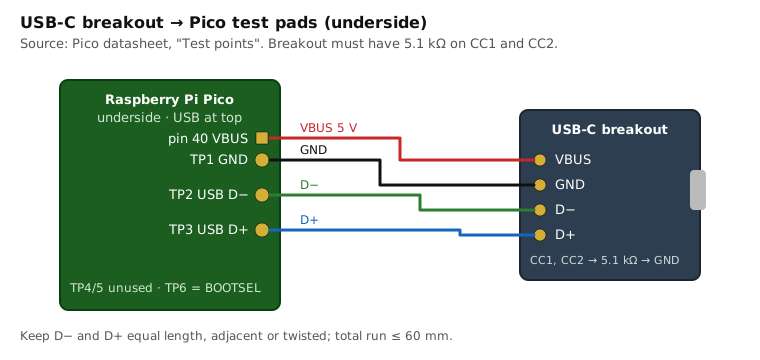
USB-C breakout to Pico test pads

USB test pads on the underside — used by the optional USB-C upgrade:

Pad Signal
TP1 GND
TP2 USB DM (D−)
TP3 USB DP (D+)
TP4 GPIO23 / SMPS mode — do not use
TP5 GPIO25 / LED — do not use
TP6 BOOTSEL

Earlier revisions of this repo said TP1 = D− and TP2 = D+. That is wrong and would short ground onto D−; see CHANGELOG.

Pico 2 (RP2350) is pin-compatible and $1 more. Before substituting it, confirm QMK’s RP2350 support for the PS/2 PIO driver in the QMK version you are building with.

Why not a bigger board? The pin budget is solved with a shift register instead — see gpio-budget.md.


Logic

74HC165 — 8-bit parallel-in / serial-out shift register

   
Role Sense-line expander. Three cascaded devices read 24 matrix sense lines through 3 GPIO.
Part Rev A: SN74HC165N (DIP-16). Rev B: SN74HC165DBR / 74HC165PW (SSOP/TSSOP).
Supply 2.0–6.0 V — runs at 3.3 V in spec
Datasheet Nexperia 74HC_HCT165 · TI SN74HC165
Buy DigiKey SN74HC165N · DigiKey SN74HC165DR · Nexperia 74HC165D at LCSC
Why Reads in parallel, shifts out serially over SPI; a 24-bit chain reads in ~3 µs. No I²C address setup, no driver dependency, and the inputs tolerate up to 15 V.

Gotchas that matter here: HC inputs have no internal pull-ups — every D0–D7 input needs an external pull-up or it floats and reads random keys. Tie CE LOW. Tie the first device’s DS to a defined level. Details in shift-register-matrix.md.

10 kΩ bussed SIP resistor network, 9-pin

   
Role Pull-ups for the 74HC165 sense inputs — one 8-resistor network per chip
Part Bourns 4609X-101-103LF or generic A09-103 (9-pin, 8 × 10 kΩ, common pin 1)
Buy Jameco SIP networks · DigiKey · Amazon kits
Why Three parts instead of twenty-four discrete resistors on a perfboard. Rev B uses 4 × 0603 arrays instead.

Discrete semiconductors

2N7002 / BS170 — N-channel MOSFET

   
Role Low-side switch for the keyboard backlight LED strip, gate driven by GP26
Package 2N7002 = SOT-23 (Rev B). BS170 = TO-92 (Rev A, hand-solderable)
Ratings 60 V, ~200–500 mA continuous, VGS(th) ≈ 1–2.5 V — turns on fully from a 3.3 V GPIO
Datasheet 2N7002 (Nexperia) · BS170 (onsemi)
Why Logic-level threshold, cheap, and the strip (~100 mA on comparable ThinkPad arrays) is far below its rating.

1N4148 — signal diode

   
Role Anti-ghosting diodes, only if the Phase 1 three-key test shows the keyboard lacks them
Package DO-35
Datasheet 1N4148 (Vishay)
Why Most ThinkPad membranes already include diodes; buy a 100-pack only after the test says so. Note that BOM.md once called these “Schottky” — they are ordinary silicon signal diodes.

Touchpad indicator LED

   
Role Shows the pointing device is active; driven by GP28 through 100 Ω
Part Any 3 mm or 0805 LED, ~2 V forward, ≤ 20 mA. The X240 palmrest may already have one on the ClickPad FPC — probing decides.

Connectors and cables

Keyboard FPC — 40-pin, 0.5 mm pitch

The X240 keyboard (FRU 0C44020) terminates in a 40-conductor 0.5 mm pitch FPC. Which of the 40 lines are matrix, power, backlight and power-button is not documented by Lenovo and is established by probing — see ../../hardware/pinout/probing_procedure.md.

40-pin 0.5 mm FPC → DIP breakout with ZIF connector (Rev A)

   
Role Brings the keyboard FPC out to 0.1” pads on the perfboard
Buy Tinkersphere 40-pin 0.5/1 mm · Amazon 2-pack · Crystalfontz (premium)
Check Contact side. Breakouts come as top- or bottom-contact; the keyboard cable’s contacts face one way. Buy a bottom-contact board or plan to use the FFC extension (below) to flip orientation.

About Adafruit #1436. Earlier revisions of this repo listed it as “ZIF FPC to DIP adapter”. Adafruit 1436 is a multi-pitch solder-pad adapter plate — it has no ZIF connector. It works only if you solder a bare FPC directly to it or fit your own connector. It is listed here so nobody buys it expecting a socket.

8–12-pin 0.5 mm FPC → DIP breakout (Rev A)

   
Role Brings the ClickPad FPC out to 0.1” pads
Buy Tinkersphere 8-pin · AliExpress 6/8/10/12-pin
Check Pin count of the X240 ClickPad cable varies by revision — count yours before ordering.

40-pin 0.5 mm FFC extension, 150 mm

   
Role Strain relief and orientation flip between the keyboard cable and the adapter inside the case
Buy BuyDisplay 150 mm 40-pin · DigiKey Molex/Würth FFC jumpers
Check “Same-side” vs “opposite-side” contacts changes pin order (Type A vs Type D). Document which you bought in the pinout file.

Hirose FH12 0.5 mm ZIF connectors (Rev B PCB)

   
Role Board-mounted FPC sockets on the Rev B PCB
Parts FH12-40S-0.5SH(55) — 40-pin bottom contact · FH12-nnS-0.5SH(55) for the ClickPad, nn from probing
Datasheet Hirose FH12 series
Buy DigiKey FH12-40S-0.5SH(55) · Mouser
Why The de-facto standard 0.5 mm FPC socket; KiCad ships its footprint.

USB-C female breakout (optional)

   
Role USB-C port for the case, wired to the Pico’s TP1/TP2/TP3 pads
Buy Adafruit 4090 (USB-C breakout) · generic “USB-C female to 6-pin” boards with 5.1 kΩ CC pull-downs
Check The breakout must have 5.1 kΩ on CC1 and CC2 or a USB-C host will not enable VBUS.

Donor parts

ThinkPad X240 keyboard

   
FRU 0C44020 (US, non-backlit) · 04X0177 / 0C43982 (US, backlit) · 04Y0938 / 0C44711 (compatible X240/X250/X260 variants)
Contains Key matrix, TrackPoint stick and its controller, power button, backlight on the backlit variants
Buy eBay 0C44020 · Amazon compatible
Reference iFixit X240 keyboard replacement · Lenovo X240 HMM

ThinkPad X240 palmrest with ClickPad

   
FRU 00HT393 (no fingerprint reader) · 00HT392 (with fingerprint reader) · touchpad alone SM10A39149
Contains Synaptics ClickPad (PS/2), palmrest, touchpad bezel. Combined “palmrest + keyboard + touchpad” listings exist and are the simplest purchase.
Buy eBay 00HT393 · iFixit 00HT393

ThinkPad X240 base cover (hand-made enclosure route E1)

   
Part numbers FRU 04X5184 / 00HT389 / 0C64937; the label on the part itself reads SCB0G39215 or AP0SX000I00 — listings use any of these for the same cover
Role Reused as the bottom enclosure — it already mates to the palmrest with the stock bosses
Buy eBay 04X5184 · eBay SCB0G39215 · Newegg

Synaptics ClickPad (inside the palmrest)

Speaks PS/2, with a pass-through (guest) port that carries the TrackPoint’s PS/2 stream inside Synaptics packets. Specification: Synaptics TouchPad Interfacing Guide (PN 511-000275; no longer hosted publicly — the working reference is the Linux driver drivers/input/mouse/synaptics.c). Architecture and packet formats in trackpoint.md.

TrackPoint controller (inside the keyboard)

Two-piece module family shared by T440/T450/T460/X240/X250/X260 — strain-gauge sensor board plus a controller (TPM754-class) that outputs PS/2. Background: sharktastica TrackPoint wiki · delingren/thinkpad_keyboards (04Y0819, documents the reset-pulse requirement on a standalone module).


Passives and hardware

Part Value Role
Resistor 4.7 kΩ ¼ W × 2 PS/2 DATA/CLK pull-ups
Resistor 10 kΩ ¼ W × 1 MOSFET gate series
Resistor 100 kΩ ¼ W × 1 MOSFET gate pull-down (LED off during boot)
Resistor 100 Ω ¼ W × 2 Backlight series (value set by measurement), touchpad LED
Capacitor 100 nF X7R × 6 Decoupling — one per 74HC165, two near the Pico
Stripboard ≈100 × 80 mm Rev A adapter (Vero stripboard)
Headers 2 × 20-pin 0.1” female Socket the Pico so it can be replaced
Standoffs M2 × 6 mm brass + M2 screws Board mounting
Heat-set inserts M2 × 3 mm Printed enclosure bosses
Wire 30 AWG wire-wrap, several colours Point-to-point on Rev A
Gasket 1 mm self-adhesive craft foam Seals the deck-to-case seam
Filament PETG, ~150 g Printed enclosure route

Tools

Tool Used for Note
Digital calipers Measuring the X240 deck, bosses, stack heights 0.01 mm resolution is enough
Temperature-controlled soldering iron, fine tip 0.5 mm pitch breakouts, SIP networks Flux and magnification strongly advised at 0.5 mm
Multimeter Continuity at the FPC, VCC identification, LED forward drop Diode mode needed
8-channel USB logic analyser Seeing PS/2 CLK/DATA while identifying ClickPad pins Cypress FX2 “Saleae clone” with sigrok/PulseView
Serial terminal CircuitPython probe tools at 115200 baud Thonny, PuTTY, screen
OpenSCAD Editing and exporting CAD Free
KiCad 8+ Rev B PCB Free
3D printer or hand tools Enclosure — see ../enclosure/printed.md and ../enclosure/handmade.md  

Back to top

GPL-2.0. Design status: not yet built — pinout and TrackPoint route are confirmed by probing (milestone M2).

This site uses Just the Docs, a documentation theme for Jekyll.