Mounting the knife
Generate the mount
The dashboard can generate and print a clamp for the holder: job type Print knife mount, set the holder diameter, the spacing of the two mounting screws and how far in front of the plate the holder sits (standoff). It is a generic clamp, not a Neptune 4 specific part: a collar slit at the front and closed by an M3 screw through two clamp ears, on a plate with two mounting holes slotted 4 mm for height adjustment. Measure your toolhead and check the STL before printing.
The generator refuses layouts that would not work, with the reason: mounting holes hidden behind the collar (no screwdriver access), a collar too short for the slotted holes, a bore cutting into the plate, or a collar sticking out behind the plate into the toolhead. See Printing from the dashboard.
Holder
- Print a clamp for the holder body: generate one as above, or remix a holder
clamp from
Printables
to bolt onto the toolhead's side screws. PETG or ABS lasts longer than PLA
next to the hotend; the shipped slicer profile is for PLA, so for PETG raise
the temperatures in
triaina/data/prusaslicer_neptune4.ini(about 240/80 C). - Mount the holder vertical, with the blade tip 2-4 mm below the nozzle
tip. The nozzle must never reach the mat: while cutting, the knife is the
lowest point of the toolhead. Measure the drop with calipers and enter it as
offset_z(positive number) so job Z refers to the knife tip. - Set blade exposure on the holder: one vinyl plus half the backing thickness, usually 0.2-0.3 mm. Check by dragging it over a scrap by hand.
Warning
The hotend must be cold (below 50 C) before mounting or removing the
holder. CUTTER_MODE switches heaters off but does not wait for them to
cool.
Measure the offset
Rough value from the mount, then fine-tune in Calibrating the knife.
- Home (
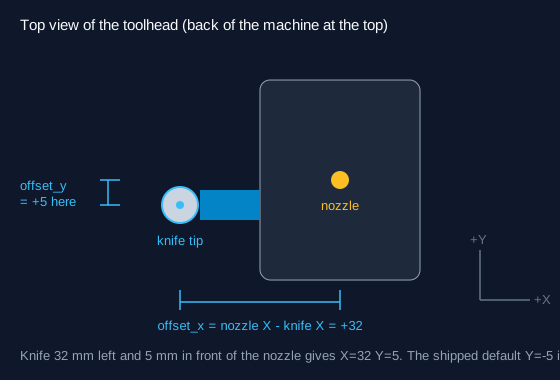
G28), move the nozzle to the bed centre at Z=5:G1 X112 Y112 Z5. - Measure from the nozzle centre to the knife centre along X and along Y with calipers.
- Enter them in
_TRIAINA_VARSasoffset_x = nozzle X - knife Xandoffset_y = nozzle Y - knife Y. Klipper adds the G-code offset to every move, so with the knife 32 mm left of the nozzle,offset_x = 32moves the nozzle 32 mm right and puts the knife on the commanded point. Positive X is toward the right of the machine; positive Y is toward the back.
Z height
The Neptune 4 homes Z with its probe at the nozzle. With the mat on the bed:
- Remove the holder,
G28(the probe needs a clear nozzle on some revisions), refit the holder, thenCUTTER_MODE. - Jog the knife over the mat and lower Z in 0.05 mm steps until the blade just touches vinyl.
- Set
z_cutto that Z minus 0.1 mm; setz_traveltoz_cut + 3.