Orphan Parts Lens
Scan what you already own. Decide what it can become. Find the missing piece on Marketplace, or prepare what you no longer need for sale or free pickup. Every answer carries its evidence, on Meta's Muse models.
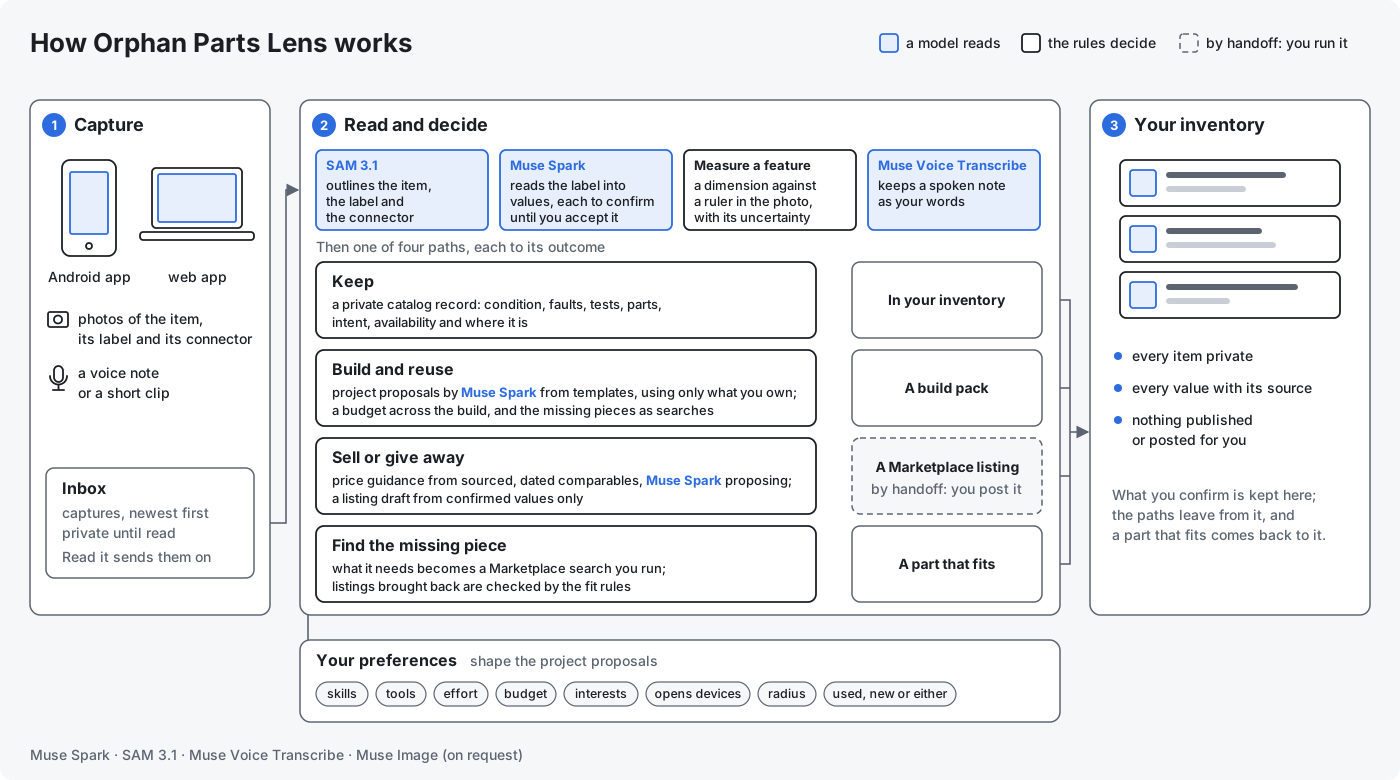
This repository is the entry for the Meta Global AI Developer Hackathon (October 27 to November 4, 2026). Everything in it was built during the hackathon; the dated log is on Built during the hackathon. One diagram of the whole, every box a link: How it fits together. Judging it: For judges starts with a two-minute fast path on the hosted app. Trying it on a phone: the five steps below.
On a phone in five steps
- Install the app on an Android 8.0 or newer phone. The QR code, scanned with the phone's
camera, or
https://github.com/nikolareljin/orphan-parts/releases/latest/download/orphan-parts.apkopened on the phone, downloads the newest release's APK.
Or, on the phone, open the latest release and tap either APK. The app is not on Google Play, so allow the browser to install unknown apps when the download opens (Allow from this source); if Play Protect warns, More details, Install anyway; afterwards a Play Protect scan in the Play Store checks it. Or over a USB cable, with USB debugging on in Developer options: from a clone,scripts/phone-install.shon the computer (on Windows,powershell -ExecutionPolicy Bypass -File scripts\phone-install.ps1), or the one-line download in the long version. - Open the web app: the hosted site,
https://orphan-parts.pages.dev; or./dev upandhttp://localhost:5173on your own computer. To pair a phone with a local server, open the site at the computer's network address, notlocalhost(for examplehttp://192.168.1.20:5173), with the phone on the same network. - Sign in: Sign in with the code in the header, then the access code you were given
(Sign out, in the same place, ends it).
A local stack has no door until
./dev gate on, which prints a code for you and one for the phone; reload the page, then sign in with yours. Without it, go on to step 4. - Pair the phone: at the foot of the page, open Pair the phone for the QR code. In the app, on the Backend tab, tap Scan to pair and point the camera at the code on a second screen, then Check. Signed in, the phone gets an access code of its own on that scan; from a page that is not signed in, the phone joins as the demo. Without Google Play services or a second screen, type the address shown under the code into Backend URL and the access code, if the site has one, into the field under it, then tap Save and Check. Pictured: Pair the phone with the web app.
- Take a photo on the app's Capture tab and tap Send; it shows in the site's Inbox.
What to do when a step fails: For judges.
The problem
Drawers and shelves hold devices, chargers, tools and parts nobody can name, price or match any more. They sit unsold because writing an honest listing is work, and a frappé maker stays without its agitator because nobody can say which rod fits. Listings for the same thing differ in one detail, and the wrong one is a trip wasted. Working devices get thrown out for lack of a plan.
Four paths on one inventory
Everything starts from a private record of what you own. A scan never publishes; a listing is a draft you approve; a search is one you run.
Catalog. Read a label with Muse Spark, with SAM 3.1 finding the label first. Every value comes with its confidence and its source, and stays to confirm until you accept it. Add what you know yourself, with how you know it. Keep the condition, faults, tests, accessories, parts as records of their own, where it is, what you mean to do with it, and whether a plan may count on it. My inventory.
Measure. Photograph a feature next to a ruler or a known rectangle, mark the reference and the feature, and get the dimension with its method and uncertainty. A blurred, oblique or unreferenced capture is refused with the reason; no reference, no number. Measure a feature.
Does it fit? A candidate is checked against what an item needs, rule by rule from the category profile, and ends in one verdict from the ladder: an unknown is never a pass, a conflict is never talked away, and every unknown becomes a question for the seller. Does it fit?.
Decide. What should I do with it? has Muse Spark write three cards for the item and for your profile, your skills rated from none to pro: keep and fix (the likely problem, the steps at your level, the parts, cost and time, or that it is not worth fixing), reuse it (two or three builds with what else you own) and sell or give away, with one recommendation. The choice is kept as the item's plan and leads to the section that follows. Decide what it becomes.
Sell and give away. Listing details: condition, what is included, faults, what was not tested, handover and area, the asking price; the lowest price you would take and your reason stay private. Price guidance from sourced comparables: asking, sold, what you reported and the model's estimate, each with its page and date, never merged; weak evidence is called weak. A Facebook Marketplace (US) draft written by Muse Spark from confirmed values only, in Marketplace's fields, with the disclosures the rules append; each field to copy, the photos as a zip in order, the create page by handoff, then listed, sold or given recorded on the item. Seller flow, Value an item.
Find the one that fits. What an item needs becomes a search plan: three to six Marketplace search links you run and a match pattern. Listings brought back as text or screenshots are ranked by the pattern, the exclusion words and the price with no model call; Check fit reads one into a candidate, assessed by the same rules, dated and placed where it stands, with the seller's questions as a message. Find a part.
Build and reuse. Say what you want from a build; Muse Spark proposes projects from templates kept as data, reading your inventory through tools, and the rules keep only what names items you have. Select a project to commit its items, one build per item, with a budget across the selected set; a missing piece becomes a search. A build pack written by the rules from what stands, versioned and stale when an input changes; Draw it for how the finished project could look; the outcome in your words, shared only as a redacted text and only when you say so. Build and reuse.
Any item
A category is a data file, a profile, that names the fields that matter, the features worth measuring with their tolerances and how to capture them, and the rules that decide a fit. Power adapters, blender and frappé maker agitators, and vacuum attachments ship as profiles; anything else goes through a generic one until a profile exists for it.
Where it runs
On the web today, behind an access code when it is public: a demo you can leave running. Without the code a visitor clicks the demo set's own photos and sees the answer recorded for each, at no cost; the code opens uploads and the live models, with allowances per visitor and per day, a spend cap and an operator's switch (Demo access). On the phone, a photo into the same inventory and a voice note kept as your words and read back (Android app); hands-free through Meta glasses, later. One backend serves all of them.
In sixty seconds
./dev up, then./dev demoto load the demo set (recorded answers, nothing spent).- Open http://localhost:5173 and read a label: one of the set's photos under
demo/photos/, answered from its recording, or, withMODEL_API_KEYin.env, a photo of your own read live. - Save it privately, confirm the values, and open Decide on the item, or ask under Does it fit? whether a listed part fits.
See the Quickstart.
Meta models
| Model | Job in the app |
|---|---|
| Muse Spark | label and listing reading into typed fields, decision cards, listing drafts, search plans, price search with citations, project proposals through tools |
| SAM 3.1 | isolates item, label and connector in photos |
| Muse Voice Transcribe | voice notes kept as the owner's words, from the web and from the phone; spoken questions later |
| Muse Image | a picture of what an item could become or of a finished project, drawn only on a click when the switch is on; illustrative, never evidence |
| Muse Wonder, Muse Glimmer, Muse Spark Open | considered, not used in this version; each page says what for |
Development uses Muse Code; see Working with Muse Code.