Find the secrets in your git history — then actually remove them.
Leak Lock scans a repository for credentials, code issues, files, and keywords using several detection engines at once, shows every finding — and which engine found it — and rewrites them out of every branch and tag, including the refs that only exist on the remote. It also removes any text you specify, not just what a scanner flagged. The cleanup is a script you can read, run from the panel, and verify — bash on macOS and Linux, PowerShell on Windows.
Six steps, from finding to verified clean
The whole tool is one loop: scan, review, fix, and confirm. Nothing runs until you have looked at the plan.
Find secrets with more than one engine
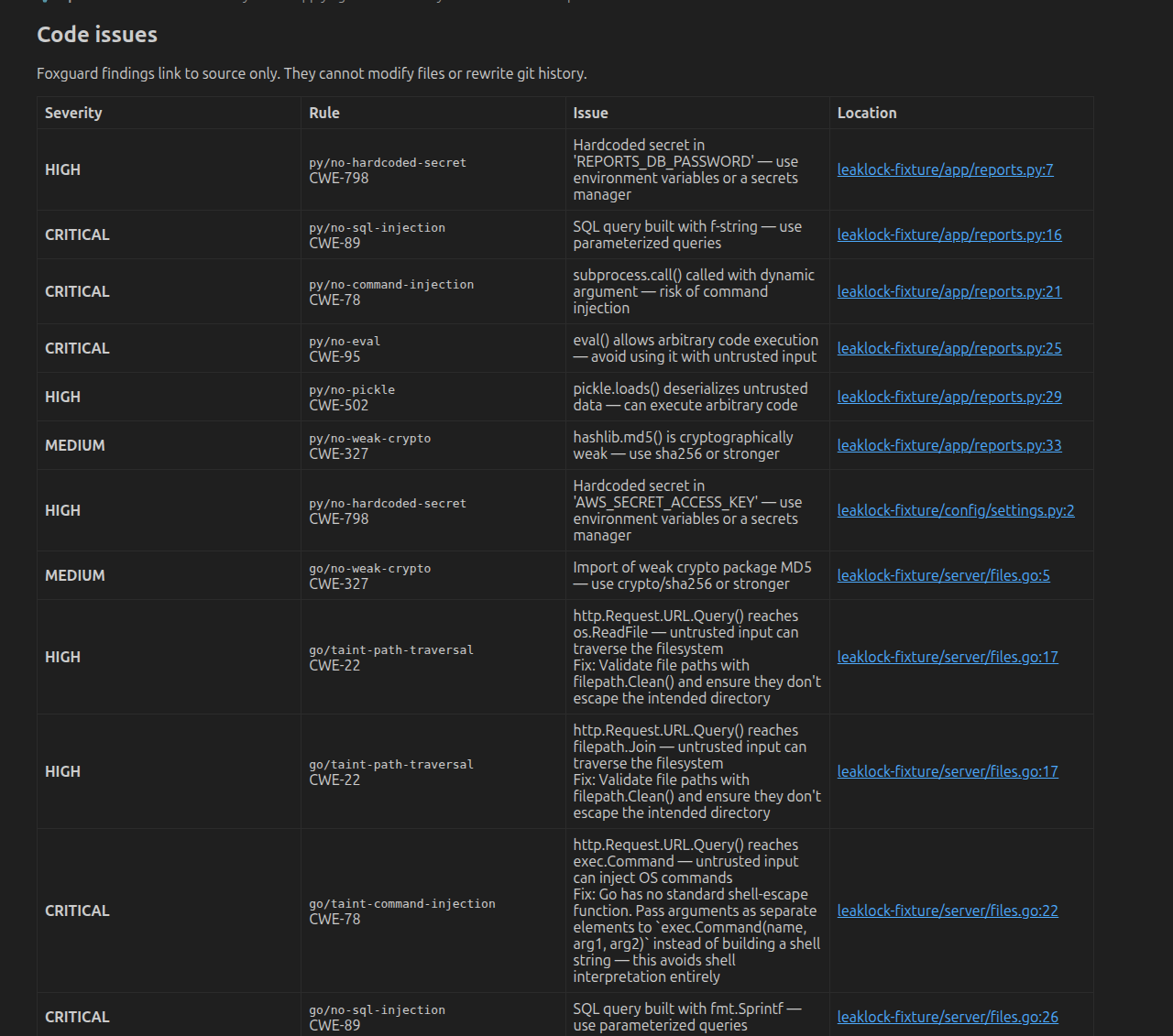
Gitleaks, TruffleHog and Nosey Parker can scan credentials across your working tree and full git history. Foxguard adds working-tree code-security issues in a separate, read-only table. The credential engines disagree more than you would expect — on a test repository one engine found seven secrets where another found two — so every credential finding names the engines that found it and the ones that missed it. TruffleHog can go further and check whether a key still works. On top of that: a path scan for files that shouldn't be there, and an opt-in keyword pass over commit messages, historical contents, and filenames for terms you choose — like id_rsa or an internal project name.
Sized to your machine
Leak Lock checks how much machine it has before it commits to a plan — cores, memory, and current load. A capable machine runs the engines in parallel, leaving cores for the editor. A modest one runs them one at a time. A genuinely constrained one runs Gitleaks alone. If an engine gets skipped for capacity, the coverage panel says so and names it: fewer engines means fewer findings, and that is not something to hide. One setting overrides the lot.
Review every finding — and what was actually scanned
Credential findings land in a table in the main panel — each one with its file and line, each history hit with the branch, commit, and date, and a live credential flagged VERIFIED LIVE. Foxguard code issues appear separately and never enter history cleanup. Credential findings and code issues each appear as soon as their engines finish, in either order, and cleanup waits until every engine is done. The compact right-side rail jumps to Results, Cleanup, or Issues in a long scan. Export credentials, code issues, and coverage to JSON or PDF.
See what a secret actually is
A rule matching tells you a string looks dangerous. It does not tell you whether that key is a 4096-bit RSA key with no passphrase or a JWT that expired last year — and those call for very different urgency. Findings that are SSH or PEM private keys, certificates, JWTs or GCP service-account files are badged with their type, and open to show the algorithm, fingerprint, whether the key is passphrase-protected, any validity window, and the claims the artifact carries. A secret the scanner cut short is identified by reading the whole file — fifty characters of a private key is not a key. All of it runs locally, and the report never contains the key body or a JWT signature. Names inside a credential are labelled as evidence, because a key comment is what the artifact says about itself, not proof of who owns it.
Follow a finding back to the commit that introduced it
Hover a file path for the absolute one; a finding from history names the commit its path belongs to, since that file may no longer exist on disk. Click the commit hash to open that file, at that commit, on GitHub, GitLab or Bitbucket, anchored to the line. The repository itself is asked which path is real, so the link is not a guess — and a self-hosted or unrecognised host shows the hash as plain text rather than a URL that would 404.
Replace strings, remove files — or redact anything you choose
Three remediation modes: replace a detected secret with a placeholder everywhere it appears, delete a file or path outright, or write your own source text → replace with rule for content no scanner flags — an internal hostname, a private repository name, a customer identifier. Manual rules match literally or by regex, and a dry run shows exactly which commits, files and branches each one touches before anything is rewritten.
Get a script for the cleanup
Every remediation is prepared as a complete, readable script — headed # Generated by Leak Lock — that runs the rewrite across all refs. Save it, read it, hand it to a reviewer, or run it yourself outside the editor. No hidden magic. You get bash on macOS and Linux and PowerShell on Windows, each doing the same work the extension would do itself: the replacement rules go to a temp file locked to your account rather than being inlined, and the file is removed even if the rewrite fails partway.
Run it, then verify
Press the button to run the rewrite from the panel, or run the script by hand. Either way it force-pushes atomically, re-fetches, and checks every remote ref — reporting any that still carry the secret by name. A cleanup it can't verify isn't finished.
What it looks like in the editor
Two surfaces: a Control Panel docked in the sidebar for setup and scanning, and a full-width scanner in the main editor area where findings are reviewed and cleaned up.



And then the part that actually changes your history
Every destructive step sits behind something you have to read first. This is the whole sequence, captured from a real cleanup of the damn-vulnerable-repo fixture.


What the script actually does
The generated script runs the same ordered sequence whether you press the button or run it yourself. In brief:
- Fetch & prune — plan against current refs, not a stale local view.
- Check for unpushed commits — stop and name them rather than discard them.
- Recreate every remote-only branch locally — the step that closes the leak:
push --force --allonly touchesrefs/heads/*, so remote-only branches would otherwise keep the old history. - Rewrite across all refs — BFG,
filter-branch, orfilter-repo, over every branch and tag. - Drop backup refs, expire the reflog, repack — so the old objects are actually gone.
- Atomic force-push, then re-fetch and verify — all refs in one transaction; then confirm each is clean on the server.
The replacement rules live in one owner-only temporary file that the script's exit trap deletes. Verification re-reads that same file, so each secret appears exactly once in the script rather than being repeated in every check — one list, one place, and no drift between what was rewritten and what is verified. The script targets bash 3.2 and runs on Linux, macOS, and Windows under Git Bash or WSL, checking its required tools up front rather than failing halfway through a rewrite.
Rewriting history changes every commit hash — teammates re-clone afterward, and the leaked credential should be rotated regardless. It's a destructive operation, run with review. If TruffleHog flagged a key as VERIFIED LIVE, rotate it first: rewriting history does not revoke a working credential.
Install in your editor
Leak Lock ships to both the VS Code Marketplace and Open VSX, so it installs in VS Code and every
OpenVSX-based editor. The extension id is nikolareljin.leak-lock on both.
VS Code Marketplace
Extensions view (Ctrl/Cmd+Shift+X) → search “Leak Lock” → Install. Or from the terminal:
code --install-extension \
  nikolareljin.leak-lock
Open VSX
OpenVSX editors can't use the MS Marketplace. Search “Leak Lock” in their Extensions view, or install from the CLI (swap in your editor's binary):
cursor  --install-extension nikolareljin.leak-lock
windsurf --install-extension nikolareljin.leak-lock
codium --install-extension nikolareljin.leak-lockFrom a VSIX
Grab the packaged .vsix from Releases, then Extensions: Install from VSIX… in the Command Palette — works in any VS Code-compatible editor.
Requires an editor on VS Code 1.96.0+. Docker must be installed and running — the extension
installs the rest of its tooling for you (next section).
Four steps in the Control Panel
Open the panel from the 🛡️ shield icon in the Activity Bar, or run
Open Leak Lock Scanner from the Command Palette. Everything below happens in the
left-hand Control Panel, top to bottom.
Install dependencies
First run only, and the requirement is one scan engine — any single one of them is enough to scan. Four engines are enabled by default. Gitleaks, TruffleHog and Foxguard install as single binaries on Linux, macOS and Windows: no Docker, no JVM. Nosey Parker, the third credential engine, runs from its Docker image and its upstream is archived. Foxguard reports code issues, not credentials, so it does not count as the one engine you need. Everything else is optional and says so rather than blocking you — Java adds BFG as an alternative to the git rewrite route that is now the default. An engine you have not installed is reported in the coverage panel and skipped; it never fails the scan.
Scan for issues
Point it at a repository (git folders are auto-detected) and run the credential scan. Results fill the table in the main area for review.
Scan strings & files
Add the opt-in keyword pass for strings, filenames, and historical contents that the credential detectors don't cover. Use it for your own naming conventions and known-bad filenames.
Remove files & directories
The Remove Files button opens the guided removal UI. Choose paths to delete or strings to replace, preview the exact matches across every ref, then generate and run the cleanup.
Add your own redaction rules
Under the results, a source text → replace with editor removes content no scanner flags — internal hostnames, private repository names, customer identifiers. Literal or regex, validated as you type, previewed against real history, and cleaned through the same verified pipeline as a detected secret.
It rewrites history. Plan for that.
! Every commit hash changes
Everyone on the repo re-clones or hard-resets after a rewrite. Agree on a time before you run it.
! Rotate the credential first
Anything that reached a remote is already compromised. Rotate it; cleaning history is the second step, not the first.
! Unpushed work blocks the rewrite
If a local branch is ahead of its remote, the run stops and lists those commits instead of discarding them. Push first.
✓ Nothing runs without review
Every cleanup is a script you can read and a plan naming each ref that will be force-updated. You approve it.